Prompt writing for ChatGPT can feel deceptively simple. You type a question, hit enter, and hope for the best. But the gap between a mediocre AI response and a genuinely useful one almost always comes down to how you structure your prompt. For beginners stepping into AI prompt engineering, understanding this distinction is the difference between frustration and productivity.
The quality of every ChatGPT interaction hinges on clarity, context, and specificity in your input. This guide walks you through the foundational steps of writing prompts that consistently produce high-quality AI responses, giving you a practical framework you can apply immediately. Whether you're drafting emails, brainstorming content, or analyzing data, these principles will transform how you interact with ChatGPT. If you want a broader foundation, our deep dive into prompt engineering, its definition, and how it works is a strong companion read.
Key Takeaways
- Every effective ChatGPT prompt includes a clear role, task, and output format.
- Vague prompts produce generic responses; specificity drives usefulness every time.
- Adding constraints like word count or tone dramatically improves AI response quality.
- Iterating on your prompts is a skill, not a sign of failure.
- Beginners who learn prompt structure early outperform casual users within days.

Step 1: Understand Why Prompt Structure Matters
ChatGPT doesn't read your mind. It reads your text, and it interprets that text literally, probabilistically, and without any background knowledge about your situation. When you type "write something about marketing," the model has thousands of possible interpretations. It might produce a college essay, a blog post, a listicle, or a historical overview. The output scatters because the input gave no direction. Structure is how you narrow the model's focus toward exactly what you need.
The Garbage In, Garbage Out Principle
This old computing adage applies perfectly to prompt engineering. A study of ChatGPT usage patterns shows that users who include specific context in their prompts report satisfaction rates nearly twice as high as those who use simple, one-line questions. The model is powerful, but it's reactive. It mirrors the precision (or lack thereof) that you bring to the conversation. Think of prompting as giving directions to a talented but literal-minded assistant.
Most beginners treat ChatGPT like a search engine, typing short queries and expecting perfect answers. But ChatGPT is a generative model, not a retrieval system. It constructs responses token by token based on probability and your input. When you provide thin input, you get probabilistically average output. That's not a flaw in the AI; it's a feature you can exploit by being deliberate about what you feed it. The difference between "tell me about dogs" and a structured prompt is the difference between a Wikipedia summary and a tailored answer.
Before writing any prompt, spend 30 seconds asking yourself: What exactly do I want this output to look like?
Understanding this principle saves you time in the long run. Instead of regenerating responses five times hoping for something useful, you invest a few extra seconds in prompt clarity upfront. That small investment compounds. Power users consistently report that structured prompting cuts their total interaction time by 40% or more, because they get usable results on the first or second attempt rather than the fifth.
Step 2: Learn the Anatomy of an Effective ChatGPT Prompt
The Role-Task-Format Framework
Every strong ChatGPT prompt contains three core elements: a role, a task, and a format. The role tells ChatGPT who to be ("You are a senior copywriter"). The task describes what you want done ("Write a product description for a bamboo toothbrush"). The format specifies how the output should look ("Use bullet points, keep it under 100 words, and end with a call to action"). When all three are present, the AI has enough constraints to produce focused, relevant output.
| Prompt Element | Purpose | Example |
|---|---|---|
| Role | Sets the AI's expertise and tone | "You are an experienced financial advisor" |
| Task | Defines the specific action | "Explain index fund investing to a 25-year-old" |
| Format | Controls output structure | "Use 3 short paragraphs, no jargon" |
| Context | Provides background information | "The reader has $5,000 to invest and no debt" |
| Constraints | Sets boundaries | "Do not recommend specific ticker symbols" |
Context is the optional fourth element, and it's what separates good prompts from great ones. Context includes background details the AI wouldn't otherwise know: your audience, your industry, prior decisions, or specific requirements. For example, "Write a welcome email" is a task. "Write a welcome email for new subscribers to a premium dog food delivery service, matching a playful brand voice" gives the model context that shapes every word it generates.
You don't need all five elements in every prompt. Role and Task are the minimum; Format, Context, and Constraints are what elevate quality.
Constraints are equally powerful. Telling ChatGPT what NOT to do can be just as valuable as telling it what to do. "Don't use technical jargon," "Avoid clichés," "Don't mention competitors by name." These boundaries prevent the model from drifting into default patterns that sound generic. As outlined in this guide on ChatGPT best practices, constraints are one of the most underused tools in a beginner's prompting toolkit, and one of the most effective.
Think of the Role-Task-Format framework as training wheels. Once you internalize it, you'll apply it instinctively. But while you're learning, write each element out explicitly. You'll notice an immediate improvement in the AI response quality, often dramatic enough that you wonder why you ever prompted without structure.
Step 3: Write Your First Prompts Using Proven Patterns
Common Prompt Patterns for Beginners
Patterns give beginners a starting template they can customize. The most versatile pattern for new users is what I call the "Act As" pattern. You start with "Act as a [role] and [task] for [audience] in [format]." For instance: "Act as a nutritionist and create a 7-day meal plan for a vegetarian college student in a table format with calorie counts." That single sentence contains role, task, context, audience, and format. It's a complete instruction set.
Another powerful pattern is the "Step-by-Step" pattern. When you need ChatGPT to walk through a process, explicitly ask for numbered steps. "Explain how to set up a Google Analytics account. Use numbered steps. Assume I have zero technical background." This prevents the model from dumping a wall of text and forces it into a sequential, logical structure. The step-by-step pattern works brilliantly for tutorials, troubleshooting guides, and instructional content.
"The best prompts don't ask ChatGPT to think harder; they make it easier for ChatGPT to think correctly."
The "Before and After" pattern is useful for editing tasks. Provide ChatGPT with your draft text and ask it to improve specific aspects. "Here's my LinkedIn post draft. Rewrite it to sound more authoritative, cut the word count by 30%, and add a stronger opening hook." This pattern works because you're giving the AI concrete material to work with, plus clear transformation criteria. It outperforms "make this better" by a wide margin every time.
Experiment with combining patterns. You might use "Act As" with "Step-by-Step" for a training scenario: "Act as a senior Python developer. Walk me through building a REST API using Flask. Use numbered steps. After each step, provide the code snippet and a one-sentence explanation of what it does." Layering patterns gives you increasingly precise control over ChatGPT's output without requiring advanced prompt engineering knowledge.
Save your best-performing prompts in a document. Building a personal prompt library accelerates your workflow significantly over time.
Step 4: Iterate and Refine for Better AI Response Quality
The Feedback Loop Technique
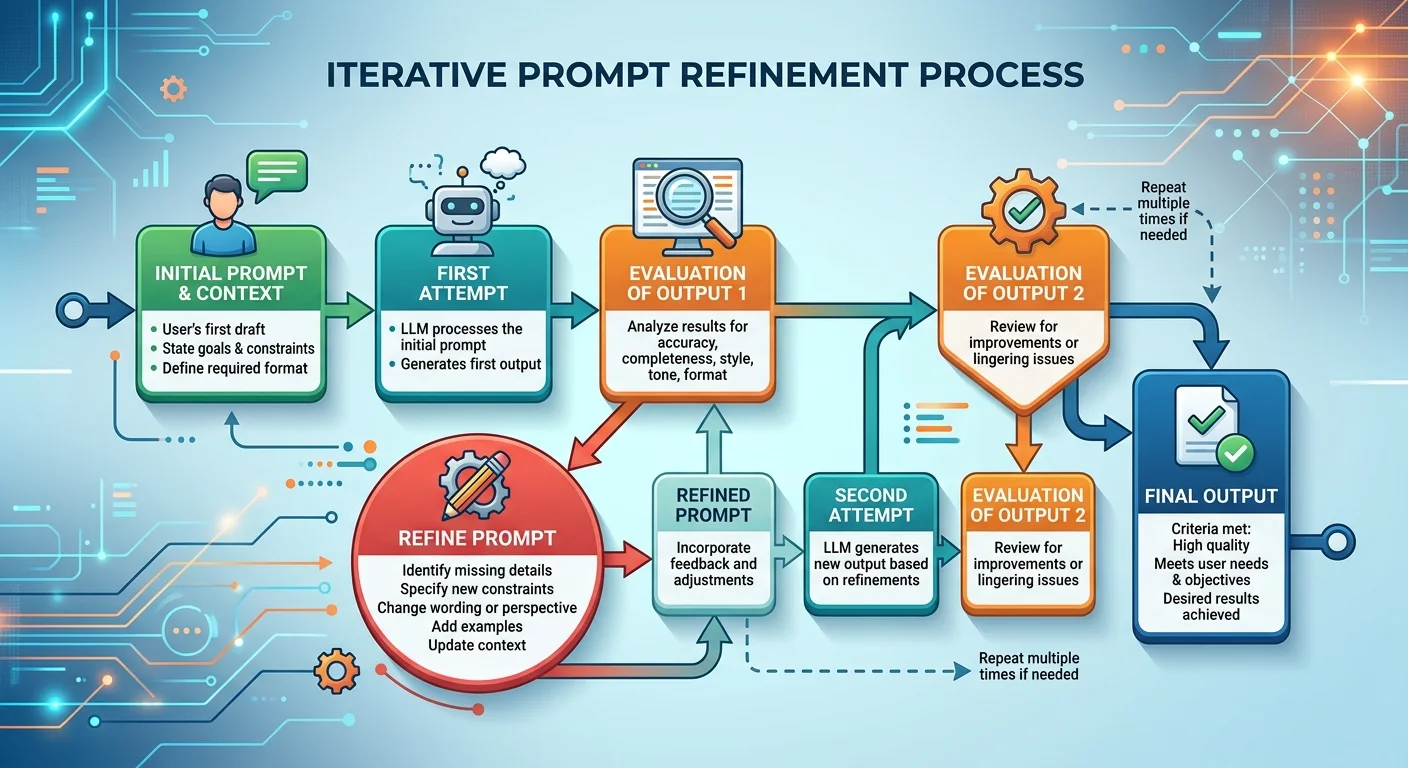
No prompt is perfect on the first try, and that's completely normal. The real skill in prompt writing isn't crafting a flawless instruction the first time; it's reading the AI's response and knowing how to adjust. This iterative process is what separates beginners from intermediate users. When ChatGPT gives you a response that's 70% right, don't start over. Instead, follow up with a refinement: "That's close, but make the tone more casual and replace the third paragraph with a real-world example."
The feedback loop technique treats your ChatGPT conversation as a collaborative drafting process. Your first prompt sets the direction. Your second message fine-tunes the content. Your third message polishes the details. Each iteration gets you closer to exactly what you need. This approach is far more efficient than trying to write the "perfect" prompt upfront, because you can react to what the model actually produces rather than predicting every possible output in advance.
Avoid starting a new chat for every refinement. ChatGPT retains context within a conversation, and that context helps it understand your preferences better with each exchange.
Pay attention to recurring issues in ChatGPT's responses. If the model consistently uses overly formal language, add "Use a conversational tone" to your base prompts. If it keeps producing lists when you want prose, specify "Write in paragraph form, not bullet points." These patterns reveal your personal prompting blind spots. Tracking them helps you develop stronger default habits. Over a few weeks of deliberate practice, you'll find that your first-attempt prompts start producing 80% to 90% satisfactory results.
One practical technique is asking ChatGPT to evaluate its own output. After receiving a response, try: "Rate this response on a scale of 1 to 10 for clarity and completeness. Then suggest three specific improvements." This meta-prompting approach gives you a second perspective and often surfaces issues you might have overlooked. It's particularly useful for complex tasks like writing, analysis, or strategy documents where quality has multiple dimensions.
Frequently Asked Questions
?How do I apply the Role-Task-Format framework in a prompt?
?Is prompt engineering different from just asking ChatGPT questions?
?How long does it take a beginner to see better ChatGPT responses?
?What's the most common mistake beginners make when writing prompts?
Final Thoughts
Learning to write effective ChatGPT prompts is a practical skill with immediate payoffs. Start with the Role-Task-Format framework, experiment with proven patterns, and build the habit of iterating rather than restarting.
Prompt clarity isn't about perfection; it's about giving the AI enough structure to work with. The more deliberately you craft your prompts, the more reliably ChatGPT becomes a genuinely useful thinking partner rather than a random text generator.
Disclaimer: Portions of this content may have been generated using AI tools to enhance clarity and brevity. While reviewed by a human, independent verification is encouraged.